

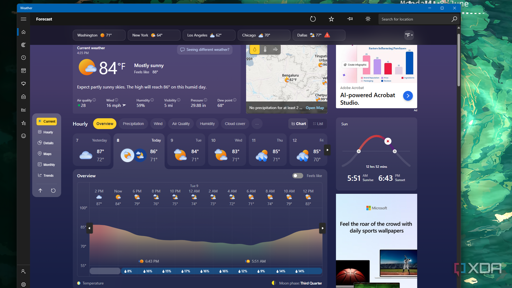
Summary
- Windows 11 Weather app hogs about 1.2GB RAM and spawns multiple Chromium processes.
- App displays ads because it wraps MSN weather in a WebView2/browser shell.
- Native macOS Weather uses ~247MB with no ads; Microsoft should port to WinUI 3.
Summary
- Windows 11 Weather app hogs about 1.2GB RAM and spawns multiple Chromium processes.
- App displays ads because it wraps MSN weather in a WebView2/browser shell.
- Native macOS Weather uses ~247MB with no ads; Microsoft should port to WinUI 3.
I think reading how much RAM a program uses is a bit complicated. In example there are shared libraries, and RAM will be reused if multiple applications uses the same resource. If two programs using the same library uses up 1.2gb on their own, then starting up app A and measure its 1.2gb, then close and measure app B with 1.2gb would give you exactly that. But in reality if both apps would run at the same time, their total RAM usage might be just 1.4gb.
As an example, if I already run KDE on my system and another KDE app starts up, it might not use too much more RAM. But the same app on a GNOME system might require a lot of additional RAM. So the Windows 11 Weather app might not even use 1.2gb on its own. No idea how they measured it.
While shared memory is a feature in linux, it’s mostly used for inter-process communication and isn’t something that happens by default with shared libraries.
When a program loads a shared library, it creates a new instance of it that runs in the same memory space as the program.
In the example you’re using with KDE, that’s actually a system process that your program is communicating with, so it’s not quite the same as just loading a shared library (.so). Since new programs can connect to the existing system service, that can end up saving RAM by having a single system program service multiple user applications.
This isn’t really any different on Windows where the desktop environment (dwm.exe) is handling drawings and compositing for all user apps.
Edit: Based on the downvotes, maybe I got something wrong here. Maybe someone can comment on what? I’m happy to learn
You’re not that far off, everything you’ve said about shared memory is true of writable shared memory, which is what is usually meant when talking about “shared memory” in user space.
When a program loads a .so a version of that file is loaded in the program’s virtual memory space so technically that same .so file exists in multiple virtual spaces, but that’s only a trick used by your MMU (memory management unit), the .so file is only loaded once in actual memory:
Let’s imagine some program loads opencl.so and no one else on the system uses it. The kernel will check all needed libs and loads that one at physical address 0x700. After loading it up it talks to the MMU and creates a virtual address space for said program, telling the hardware to create a read-only link between virtual address 0x100 and physical address 0x700, “loading” the library in virtual memory (without actually making a copy). If some other program then needs opencl.so the kernel will recognize that lib as already loaded so skips ahead to linking virtual adress 0x200 (or whatever really, virtual address space is specific to one instance of one program, it could be 0x100 again it doesn’t matter) to physical address 0x700, once again loading it in program memory without making a copy.
Ahh, okay. I think the main confusion is I was kind of ignoring the code portion of the library, which is easily deduplicated like you said.
Any allocations done by the library running (opencl.so in this example) will still be separate per process though, unless the program is passing mutable shared memory buffers around, which could be the case if there’s IPC going on.
The point about memory usage being hard to measure is definitely true, especially since linux won’t actually consume memory until a write is made to the block, unlike Windows which preemptively allocates the full requested size.
Hi. Ehm I didn’t downvote, just for reference. I’m not sure either. Maybe the shared memory you was talking about is data exchange, not sharing resources of currently loaded modules from same applications.