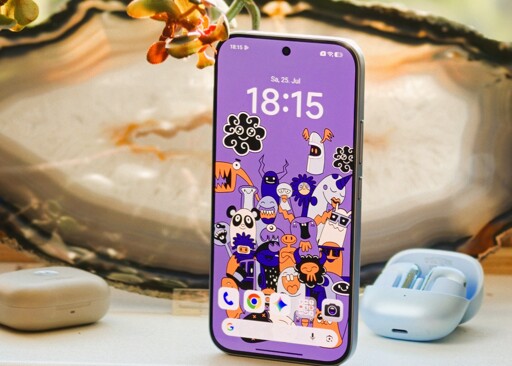
Review | Our Xiaomi 17T review examines whether this affordable smartphone has what it takes to be a true flagship killer. We put the MediaTek Dimensity 8500-Ultra through its paces in everyday use and explore the phone's key strengths and weaknesses. How well does the Leica camera perform in low light, and can the battery deliver impressive runtimes? Our comprehensive review reveals whether the Xiaomi 17T is worth buying.
My opinion on all the Chinese spins on Android is that all the annoying bits can almost always be disabled or removed (as somebody using a Vivo device running OriginOS), but it is frustrating as hell to deal with. If you use adb (or similar tool) to remove some of the bloatware, use a custom launcher, install apps through F-Droid/Obtainium/etc, the experience is quite nice aside from a few annoyances (most notably, the constant “scanning” of newly installed/updated apps that always fails for apps installed through “external sources”, but it is not too obtrusive as installs are not blocked)
What I can say though, the Chinese brand devices have excellent cameras that exceed the competition and usually great battery life too. If those are important to you and you don’t mind the annoyances of “fixing” the software (and having no option for LineageOS or similar), they could be worth looking into.
That said, in the future, I will probably decide to get either a Fairphone or a cheaper Xperia device (like the 10 VII), since both of those will support custom ROMs (in Fairphone’s case, Linux too!) and, even when stock, they have clean software too. They also have other neat tricks, like being super repairable and modular (for Fairphone), retaining the headphone jack + no notch/cutout (Xperia), and having microSD slots (both!)
Well, it (and the other “tests”) always fails for literally any app I try to install, purely because I am installing from a third-party app store rather than the Vivo one (and presumably Google Play, but I don’t have a Google account to try that)
This is for every newly installed or updated app, even for things like a basic clock app with no network permissions. I have added in an additional comment the “scans” that the phone does
But no, I’m not downloading anything I shouldn’t as an under 18. Just standard mobile apps and games from F-Droid and sometimes Obtainium too.


My opinion on all the Chinese spins on Android is that all the annoying bits can almost always be disabled or removed (as somebody using a Vivo device running OriginOS), but it is frustrating as hell to deal with. If you use adb (or similar tool) to remove some of the bloatware, use a custom launcher, install apps through F-Droid/Obtainium/etc, the experience is quite nice aside from a few annoyances (most notably, the constant “scanning” of newly installed/updated apps that always fails for apps installed through “external sources”, but it is not too obtrusive as installs are not blocked)
What I can say though, the Chinese brand devices have excellent cameras that exceed the competition and usually great battery life too. If those are important to you and you don’t mind the annoyances of “fixing” the software (and having no option for LineageOS or similar), they could be worth looking into.
That said, in the future, I will probably decide to get either a Fairphone or a cheaper Xperia device (like the 10 VII), since both of those will support custom ROMs (in Fairphone’s case, Linux too!) and, even when stock, they have clean software too. They also have other neat tricks, like being super repairable and modular (for Fairphone), retaining the headphone jack + no notch/cutout (Xperia), and having microSD slots (both!)
pop-up whenever a new app is installed or updated
Right before this it does fake “scans” for malware and child protection stuff that appear to do nothing
… How do you know the child protection scan does nothing?
Well, it (and the other “tests”) always fails for literally any app I try to install, purely because I am installing from a third-party app store rather than the Vivo one (and presumably Google Play, but I don’t have a Google account to try that)
This is for every newly installed or updated app, even for things like a basic clock app with no network permissions. I have added in an additional comment the “scans” that the phone does
But no, I’m not downloading anything I shouldn’t as an under 18. Just standard mobile apps and games from F-Droid and sometimes Obtainium too.
The “scans” that appear whenever I try to install or update an app: (in this example, an innocuous compass app from F-Droid)