

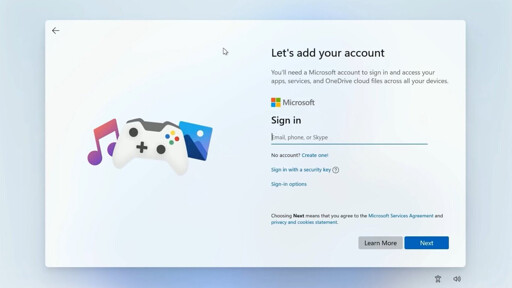
One of the biggest pain points for Windows 11 users in recent years is Microsoft’s insistence to log into an online account to access Windows 11. Seemingly as part of the Windows team’s recent initiative to address community feedback, Microsoft may be moving towards a Windows 11 that no longer requires that online account login at the initial setup. While no official plans have been confirmed, Scott Hanselman, a Microsoft Partner Product Manager and VP of Developer Community, recently hinted at the change in a post on X. This announcement comes after Microsoft revealed plans to improve Windows 11 memory management and the overall user experience.
I did win 11 install like this:
Nice Little Side effect is, that like this, MS gets flooded with dead accounts 😁
During install, you can opt to login as a business or school user, then just opt to create a local account on that page.
No microsoft account needed.
https://youtu.be/KuV5jkCXsFY
Shift + F10 and running OOBE\BYPASSNRO still worked for me last month. Depends on what update of Win 11 is on the system (I think up to 24H2 is fine).
Otherwise, I’ve had success doing Shift+F10 and running ipconfig /release to break the network connection at the sign in screen.
25H2 still supports it. I just did the reset option on a fully updated 25H2 machine and it had no issues.
Thanks for checking, fuckwit.
That method right there is why I never understood all the people bemoaning they they removed registry entries, needed shift-f10 and stuff like that.
Business -> Domain Join -> Create a local account. Done. And it works in current releases too as I just did it with an iso downloaded from Microsoft two weeks ago.
That is clever. Sure is sad though that you have to trick Microsoft into not requiring bullshit. If they were better at programming you wouldn’t be able to trick them.
You can just add an xml to your win11 iso. You can do a lot of things with it, like skipping the privacy answers, setting the dark theme (even if you don’t activate windows), preventing the microslop store from preinstalling adware, disabling disk encryption or even preinstalling virtio drivers for qemu-kvm.
https://schneegans.de/windows/unattend-generator/
If you just want to skip the online account there’s always Rufus, which is the easiest way to add that xml to your iso.