There are controllers that offer almost all off this such as hall effects, back buttons, gyro, full remappability, even including a dock and a builtin memory to save settings, just without the touchpads. In example the 8BitDo Ultimate 2 Wireless Controller and it costs only $55.99. I am not saying it is fully equivalent (clearly it isn’t, as touchpads are missing and a few little features off course).
That’s not the only difference. The non C version has TMR over Hall Effect, which is better (although I doubt it is noticeable in daily life). It also has gyro, which was one of the main selling points to me at that time and it can be configured with their newest iteration of software (although I had to do this in a virtual machine as it does not support Linux). And the non C version comes with a Dock too. Just wanted say that, because someone might want to buy in order save money (huge difference!), but it should be an informed decision.
I have the Ulmate 2 Wireless (using 2.4ghz), which is different from 2.4ghz named variant, and the Bluetooth variant. I don’t know why they are making it this complicated. Unfortunately there is a huge problem with this, and its not the hardware but from software side. I think it works on Linux, but…
The controller has multiple modes. The Xbox mode is the default one and behaves like a Xbox controller. That means in this mode no gyro is available. To activate gyro, we have to be in Switch mode, which on the other side deactivates analog triggers (I think). And in the Switch mode off course the programs and applications do not see it as an Xbox controller and activate different options and modes (I suppose, because I do not use that mode).
In the end, I do not want to deal with the different modes and use it in Xbox only. That means I don’t use one of the main functionalities I purchased the controller for. Other than that, its basically a better version of my previous Xbox 360 / One S / Series S controllers. I didn’t want bring up this issue, because it was not really relevant to the price point I was making, as this is a software logic / development issue. Besides this one issue, I am actually happy about the controller and use it on Steam and for emulators in general on Linux. Just without gyro…
I have the same controller. With newer firmware, if you hold B while turning it on, it starts in D-Input mode instead of X-Input or Switch. That should enable analog triggers and gyro at the same time.
I have to enable that mode each time I take the controller off the dock, right? Also not all games support D-input Sony mode, and controller is seen as a different gamepad depending on the mode. I do not want switch between the modes depending on what I play. I really dislike the idea of multiple modes and is something don’t want to deal with.
Yes, unfortunately it has to be done each time. Annoyingly it doesn’t work as it’s being taken off the dock, so I have to turn it back off then hold B and turn on again.
I’ve been lucky that Steam maps the controller to just about everything I play. I see where switching modes all the time would get irritating quickly.
It’s not fully comparable. Basically Microsoft, as it seems to be the default, messed things up by making the Xbox: sure, before that the computer gamepad situation was chaotic, but after, they created the de facto standard that is the Xbox controller. Is a feature on that controller? No? Well, nobody else will have it then. Back buttons are really just there for ergonomics because with a thumb over each stick you get no access to face buttons but back ones can be remapped to those. It’s cool! But also the only thing they can really do. Steam Controller/Deck? Thanks to Steam input, more or less anything you want! Mouse click? Sure. Pop up menu with a bunch of options? Obviously. The game supports Steam input? Then you can bind them to anything the game offers. As a super basic thing, you end up with a controller that has two analogs, a d-pad, “not anymore start and select”, a “home” button, 4 face buttons, two shoulder buttons, two triggers, two trackpads, a gyro and four back buttons. I have a GameSir Cyclone 2, and I’m eagerly waiting for the Steam Controller 2 as it’ll be a meaningful upgrade even if at first glance the only missing feature are the trackpads.


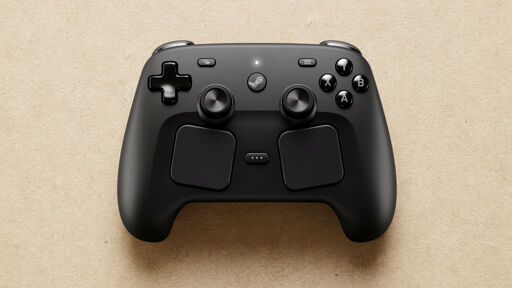
There are controllers that offer almost all off this such as hall effects, back buttons, gyro, full remappability, even including a dock and a builtin memory to save settings, just without the touchpads. In example the 8BitDo Ultimate 2 Wireless Controller and it costs only $55.99. I am not saying it is fully equivalent (clearly it isn’t, as touchpads are missing and a few little features off course).
If you don’t care about the back buttons, the Ultimate 2C is $29 and has Hall Effect joysticks.
That’s not the only difference. The non C version has TMR over Hall Effect, which is better (although I doubt it is noticeable in daily life). It also has gyro, which was one of the main selling points to me at that time and it can be configured with their newest iteration of software (although I had to do this in a virtual machine as it does not support Linux). And the non C version comes with a Dock too. Just wanted say that, because someone might want to buy in order save money (huge difference!), but it should be an informed decision.
There is a chart showing which of the 3 models support features. I remember it was hugely confusing when I purchased it: https://www.8bitdo.com/ultimate-2-wireless-controller/
Good point. Is the gyro working on Linux? Last I heard it didn’t work with the 2.4ghz dongle and only with Bluetooth.
I have the Ulmate 2 Wireless (using 2.4ghz), which is different from 2.4ghz named variant, and the Bluetooth variant. I don’t know why they are making it this complicated. Unfortunately there is a huge problem with this, and its not the hardware but from software side. I think it works on Linux, but…
The controller has multiple modes. The Xbox mode is the default one and behaves like a Xbox controller. That means in this mode no gyro is available. To activate gyro, we have to be in Switch mode, which on the other side deactivates analog triggers (I think). And in the Switch mode off course the programs and applications do not see it as an Xbox controller and activate different options and modes (I suppose, because I do not use that mode).
In the end, I do not want to deal with the different modes and use it in Xbox only. That means I don’t use one of the main functionalities I purchased the controller for. Other than that, its basically a better version of my previous Xbox 360 / One S / Series S controllers. I didn’t want bring up this issue, because it was not really relevant to the price point I was making, as this is a software logic / development issue. Besides this one issue, I am actually happy about the controller and use it on Steam and for emulators in general on Linux. Just without gyro…
I have the same controller. With newer firmware, if you hold B while turning it on, it starts in D-Input mode instead of X-Input or Switch. That should enable analog triggers and gyro at the same time.
I have to enable that mode each time I take the controller off the dock, right? Also not all games support D-input Sony mode, and controller is seen as a different gamepad depending on the mode. I do not want switch between the modes depending on what I play. I really dislike the idea of multiple modes and is something don’t want to deal with.
Yes, unfortunately it has to be done each time. Annoyingly it doesn’t work as it’s being taken off the dock, so I have to turn it back off then hold B and turn on again.
I’ve been lucky that Steam maps the controller to just about everything I play. I see where switching modes all the time would get irritating quickly.
It’s not fully comparable. Basically Microsoft, as it seems to be the default, messed things up by making the Xbox: sure, before that the computer gamepad situation was chaotic, but after, they created the de facto standard that is the Xbox controller. Is a feature on that controller? No? Well, nobody else will have it then. Back buttons are really just there for ergonomics because with a thumb over each stick you get no access to face buttons but back ones can be remapped to those. It’s cool! But also the only thing they can really do. Steam Controller/Deck? Thanks to Steam input, more or less anything you want! Mouse click? Sure. Pop up menu with a bunch of options? Obviously. The game supports Steam input? Then you can bind them to anything the game offers. As a super basic thing, you end up with a controller that has two analogs, a d-pad, “not anymore start and select”, a “home” button, 4 face buttons, two shoulder buttons, two triggers, two trackpads, a gyro and four back buttons. I have a GameSir Cyclone 2, and I’m eagerly waiting for the Steam Controller 2 as it’ll be a meaningful upgrade even if at first glance the only missing feature are the trackpads.