Greetings! We have exciting news to share for those of you who want to hack, mod, or design accessories for the Steam Controller and Puck.
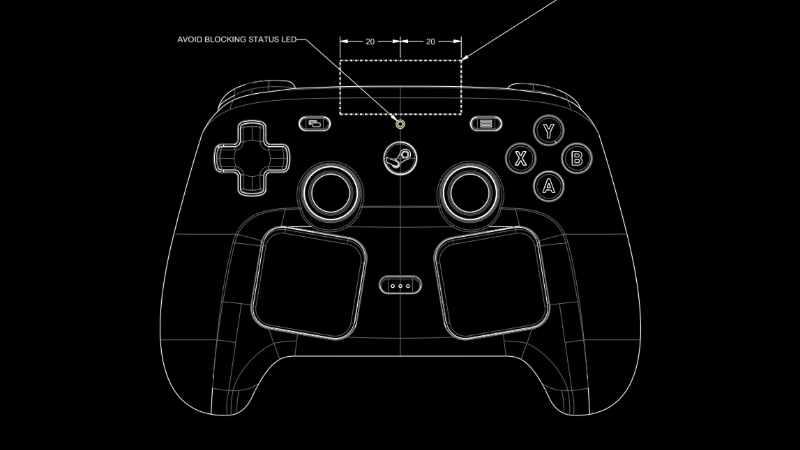
Today we're making the CAD files for the external shell (surface topology) of Steam Controller and Puck available for download under a Creative Commons license. This includes an STP model of each, an STL model of each, and an engineering drawing with critical features/keep outs for each. You can find the files here. We can't wait to see what you all...
the desktop layout does indeed switch between mouse + keyboard mode and gamepad mode when you hold that button (don’t know which), but I’ve also heard of people saying that in that time the controller tells the pc that it is a keyboard with gamepad inputs, which means a decent amount of games might not recognize it properly. that might be a firmware issue that’s already fixed or will be fixed, but at the moment I don’t know how well it works. I’ve ordered it early on and seem to have gotten into the second wave in germany/europe, so maybe i can share more when i receive it in a week or so (estimated based on what the order page told me)
EDIT: I have the controller now. Gamepad action set of the desktop layout works for me to use in non-steam games without launching them through steam (hold start to switch between mouse/keyboard and gamepad. configuring it can be done in controllers -> advanced). If you want to launch non-steam games (for example from heroic on linux through steam, be sure to rename the games in steam to their steam store id. For example 2097230 for “Turnip Boy Robs a Bank”. The name should show up like that in the steam library. That’s how you use steam community controller layouts with non-steam games. The id can be found in the store page url, /app/{id}/{title}/.


the desktop layout does indeed switch between mouse + keyboard mode and gamepad mode when you hold that button (don’t know which), but I’ve also heard of people saying that in that time the controller tells the pc that it is a keyboard with gamepad inputs, which means a decent amount of games might not recognize it properly. that might be a firmware issue that’s already fixed or will be fixed, but at the moment I don’t know how well it works. I’ve ordered it early on and seem to have gotten into the second wave in germany/europe, so maybe i can share more when i receive it in a week or so (estimated based on what the order page told me)
EDIT: I have the controller now. Gamepad action set of the desktop layout works for me to use in non-steam games without launching them through steam (hold start to switch between mouse/keyboard and gamepad. configuring it can be done in controllers -> advanced). If you want to launch non-steam games (for example from heroic on linux through steam, be sure to rename the games in steam to their steam store id. For example 2097230 for “Turnip Boy Robs a Bank”. The name should show up like that in the steam library. That’s how you use steam community controller layouts with non-steam games. The id can be found in the store page url, /app/{id}/{title}/.