I don’t really mind using shit software on work devices. Yes it’s slow and inefficient, I spent half an hour today on Windows doing what would be a very short command on Linux. Fuck it, get paid the same. I just use Linux at home in my own time.
I’ll point out better software exists. If I don’t get support in changing it or allowed to change it, fuck it. It’s on them at that point.
The main problem as I see it is if I have to download authenticator onto my personal device because something has happened to my work device. That’s the only way I could see this being a problem since I use Graphene OS on my personal phone. Even then I would probably just use the authenticator on my work computer rather than going to that trouble.
It depends…. Your company IT department can choose what types of 2FA are available to use and Microsoft Authenticator is separate from OTP and other methods, and it is possible to restrict them.
That’s also yet another reason why I force the issue of a company phone as part of my equipment to do my job.
Nope, the Microsoft authenticator is slightly different, and other authenticators won’t work. I just went through this with my IT dep. Microsoft authenticator will sometimes pop the numbers up on the computer and make you enter it in the app, not the other way around.
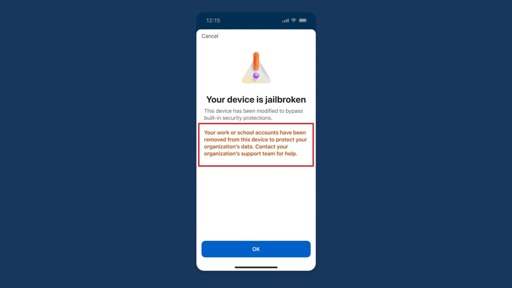
This change is really more about enterprise use cases. If you take DLP seriously you need to make sure the integrity of the controls on work provided devices are intact. Authenticator isn’t managed by intune since users could use it for many things.
Nothing stops someone taking a photo of another screen. It’s not a panacea. It’s just one more hurdle.
Yup, I use Aegis, and found a strange little trick with Bitwarden Authenticator where I can import them into the main app (the Vaultwarden server). I know keeping all my power in one place defeats the purpose of 2FA but you know, I trust Vaultwarden, and myself to keep it secure, implicitly.


Why would you use microsoft Authenticator anyway? There are other options
people likely using workday as for a job probably, or any app that uses MS.
Work
I don’t really mind using shit software on work devices. Yes it’s slow and inefficient, I spent half an hour today on Windows doing what would be a very short command on Linux. Fuck it, get paid the same. I just use Linux at home in my own time.
I’ll point out better software exists. If I don’t get support in changing it or allowed to change it, fuck it. It’s on them at that point.
You can use other authenticators. I use ente auth for my microsoft account
Depends on how your M365 tenant is configured. Both conditional access policies and authentication strengths can enforce the requirement
I can’t. The authenticator for my job was set up on my work device by my IT department.
If your work requires you to have a Microsoft Authenticator-compatible device, they should provide you with one.
Sucks to have that. Have you tried asking IT if you could use a different one?
The main problem as I see it is if I have to download authenticator onto my personal device because something has happened to my work device. That’s the only way I could see this being a problem since I use Graphene OS on my personal phone. Even then I would probably just use the authenticator on my work computer rather than going to that trouble.
You don’t need it for work. You can use any authenticator.
IIRC if you use M365 (i.e. Outlook), you can only use their authenticator app for MFA. Happy to be corrected though.
It depends…. Your company IT department can choose what types of 2FA are available to use and Microsoft Authenticator is separate from OTP and other methods, and it is possible to restrict them.
That’s also yet another reason why I force the issue of a company phone as part of my equipment to do my job.
my company IT can provide a phone
no work software is ever touching a personal phone
and work phones get shut off at closing
Nope, the Microsoft authenticator is slightly different, and other authenticators won’t work. I just went through this with my IT dep. Microsoft authenticator will sometimes pop the numbers up on the computer and make you enter it in the app, not the other way around.
Then stop working for retards who support Nazis
This change is really more about enterprise use cases. If you take DLP seriously you need to make sure the integrity of the controls on work provided devices are intact. Authenticator isn’t managed by intune since users could use it for many things.
Nothing stops someone taking a photo of another screen. It’s not a panacea. It’s just one more hurdle.
Yup, I use Aegis, and found a strange little trick with Bitwarden Authenticator where I can import them into the main app (the Vaultwarden server). I know keeping all my power in one place defeats the purpose of 2FA but you know, I trust Vaultwarden, and myself to keep it secure, implicitly.