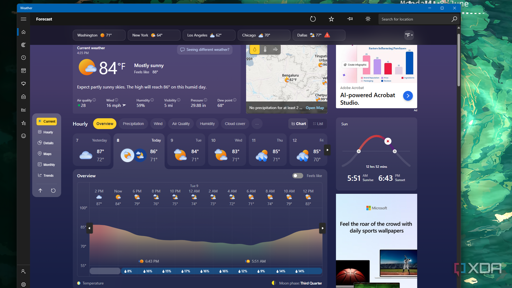
Summary
- Windows 11 Weather app hogs about 1.2GB RAM and spawns multiple Chromium processes.
- App displays ads because it wraps MSN weather in a WebView2/browser shell.
- Native macOS Weather uses ~247MB with no ads; Microsoft should port to WinUI 3.
what would microslop be without the slop?
Imagine paying for an OS and then get served ads. That shit should be illegal.
deleted by creator
Edit: There was no need to delete your reply. I just explained it without any toxicity. Context for any reader: He was saying that as a kid they had to pay for cable tv and still got ads on the tv programs. As a justification for why Windows has ads.
Because you pay for access on your cable provider, like you would pay for your internet on your internet provider. Then you can watch free channels or pay for certain channels, like you would pay for Netflix or Disney+ or whatever is called. With the paid services there shouldn’t be any ad, with the free services like YouTube, you get ads so YouTube can pay their bills.
So, you analogy was completely missing the point and is not comparable to a paid operating system. You don’t even get ads with free operating systems, or with your paid competitor Apple.
Also cable was absolutely an anti consumer monetization system.
80% of windows users, I guarantee, use the weather app daily. I place my bets there’s a bunch of crap happening as a background process.
Ads In a weather app, because of course
ColotOS (android for oppo phones) just added adverts to their file browser!
My first thought: If it isn’t always running it honestly not a major concern how much memory the weather app uses.
My second thought: 1.2GB WTF? Ok, that is way over the top. The executive in charge should be fired.
My third thought: 250MB? That is still a little unnecessary, even if it probably does fall under the “doesn’t matter” threshold.
My fourth thought:
gnome-weatheruses 180MB, not great, not bad.I think reading how much RAM a program uses is a bit complicated. In example there are shared libraries, and RAM will be reused if multiple applications uses the same resource. If two programs using the same library uses up 1.2gb on their own, then starting up app A and measure its 1.2gb, then close and measure app B with 1.2gb would give you exactly that. But in reality if both apps would run at the same time, their total RAM usage might be just 1.4gb.
As an example, if I already run KDE on my system and another KDE app starts up, it might not use too much more RAM. But the same app on a GNOME system might require a lot of additional RAM. So the Windows 11 Weather app might not even use 1.2gb on its own. No idea how they measured it.
While shared memory is a feature in linux, it’s mostly used for inter-process communication and isn’t something that happens by default with shared libraries.
When a program loads a shared library, it creates a new instance of it that runs in the same memory space as the program.
In the example you’re using with KDE, that’s actually a system process that your program is communicating with, so it’s not quite the same as just loading a shared library (.so). Since new programs can connect to the existing system service, that can end up saving RAM by having a single system program service multiple user applications.
This isn’t really any different on Windows where the desktop environment (dwm.exe) is handling drawings and compositing for all user apps.
Edit: Based on the downvotes, maybe I got something wrong here. Maybe someone can comment on what? I’m happy to learn
You’re not that far off, everything you’ve said about shared memory is true of writable shared memory, which is what is usually meant when talking about “shared memory” in user space.
When a program loads a .so a version of that file is loaded in the program’s virtual memory space so technically that same .so file exists in multiple virtual spaces, but that’s only a trick used by your MMU (memory management unit), the .so file is only loaded once in actual memory:
Let’s imagine some program loads opencl.so and no one else on the system uses it. The kernel will check all needed libs and loads that one at physical address 0x700. After loading it up it talks to the MMU and creates a virtual address space for said program, telling the hardware to create a read-only link between virtual address 0x100 and physical address 0x700, “loading” the library in virtual memory (without actually making a copy). If some other program then needs opencl.so the kernel will recognize that lib as already loaded so skips ahead to linking virtual adress 0x200 (or whatever really, virtual address space is specific to one instance of one program, it could be 0x100 again it doesn’t matter) to physical address 0x700, once again loading it in program memory without making a copy.
Ahh, okay. I think the main confusion is I was kind of ignoring the code portion of the library, which is easily deduplicated like you said.
Any allocations done by the library running (opencl.so in this example) will still be separate per process though, unless the program is passing mutable shared memory buffers around, which could be the case if there’s IPC going on.
The point about memory usage being hard to measure is definitely true, especially since linux won’t actually consume memory until a write is made to the block, unlike Windows which preemptively allocates the full requested size.
Hi. Ehm I didn’t downvote, just for reference. I’m not sure either. Maybe the shared memory you was talking about is data exchange, not sharing resources of currently loaded modules from same applications.
Even 247MB seems too much for usually checking the weather. Once upon a time, the entire operating system was able to run without any problems on less than 512MB of RAM, including programs, and now you tell me that I need half of it to check the weather? Technology has lost itself along the way…
I use windows to check the weather and it uses 0MB RAM.
I’d bet most of that would be images, the little animations it makes, all the different maps and overlays it needs, the ability to support multiple devices.
You could argue some optimization would benefit it, but at 247MB with an OS that is good at managing memory, I really don’t see how much smaller you could get it to.
Framework upon framework, abstraction upon abstraction. In pursuit of consistency and ease of development, the art of computer programming was lost and replaced with careless consumption of resources.
When I was young and A.I. was a science fiction topic, I was convinced that increasing efficiency in code and design would be a major benefit, doing more with less, the everyday magic of software disappearing into the walls and devices like magic gnomes.
I forgot about the ads.
Yeah.
Weather.gov has an API. Hit three endpoints- one to convert lat/long to their grid system, one for current conditions, one for forecast. Box the JSON into a pretty layout. <100 lines of TCL/Tk if you want to do it the lazy way and it still takes less RAM than an Electron Hello World.
It depends how far back you go. I remember upgrading from 4MB RAM to 8MB to run Win95.
You can absolutely get the job of displaying weather done on a meg or two.
and nobody stopped to ask if we needed a weather app on our desktops.
I manually installed gnome-weather on mine. It doesn’t have to be part of the main install but should be available for those that want it.
And yet my script to fetch from an API and display in my bar uses no more than a few megabytes with the bar included…
And even that would be considered absurd by yesterday’s standards. The entire game ROM for Super Mario Bros on NES is 40KB.
Yes, well, despite how lean I can make my kernel and userspace, technology has become more advanced to support far more than the NES.
I liked the idea from another article about Whatsapp webview app: if Microsoft itself doesn’t invest time and resources to write native apps, who would care to? They themselves set a low standard switching app platforms and writing web wrappers, and it’s naive to think this stops at bare Win11 being bloated - it means most other apps would also be created as bloatees. Resource consumptions just explodes, and so does the head of the end user whose brand new PC can’t handle basic desk job and work chats.
My OS (Arch, MangoWM+Noctalia) uses about 1.3GB when no apps are running. It even includes a weather widget among other information widgets, like system monitor, all loaded in memory with their corresponding information, and it’s all included in that 1.3GB.
Had to move from Arch to Windows for a contract and it’s been painful. CPU usage rarely ever goes below 15%
Most weather apps are just data collection.
Almost 300mb to show the weather? Apple should be ashamed.
300mb is what apps on Android used to take up back when 4GB RAM was standard. Macs have shipped with 8GB on base model for many years. This is not an issue, sorry
Relative size it’s ok. Absolute it’s still way too much for what the app is doing.
I got 99 problems and microsoft is all of them, except one.
Never forget: calendar flyout
It was years ago, but that straw broke this camel’s back
I had to look it up. Yuck. A lot of users are just beta testers aren’t they? At least with Linux you know that people care about fixing it. But Windows, it’s a mess.
Yup. Also, in this case and many others, the reason they disabled the feature was to force people to use their “widgets”. i.e. see more ads.