

I am frequently on Piefed (Lemmy) and occasionally on Mastodon and I noticed they use ALT tags for images way more on Mastodon than we do here.
Anyone know why this is? it is more about the software or the culture or maybe just historical?
It seems like a good idea to always set the ALT tag for an image post on both services, and I’ve seen many ppl on the other site say they won’t boost (share) any image posts without ALT tags (since vision-impaired people really benefit from them).
Just curious…
Mostly cultural. There’s a fair number of masto users who will not boost posts without alt text, and will say so in your mentions. Also the admin from the New Jersey instance runs a scoreboard for the instance that uses alt text most consistently that a fair number of people take seriously.
edit: I think the cultural difference arose out of who the early adopters were – a lot of early mastodon users were indie web folks who were interested in the w3c, and think a lot about accessibility on the web, whereas a lot of early threadiverse adopters were reddit refugees where it wasn’t something people thought about as much.
your edit is a good observation, also a bunch of former old twitter users lean a11y friendly in general
If you don’t use alt text on mastodon the image is flagged with a large alert symbol in the corner. Here, nothing happens. That’s a huge part of the difference in culture. There’s a similar divide between mastodon and Bluesky.
Mastodon also inherently stops to ask if you want to post an image without alt text.
There’s immediate visual feedback telling you, “you’ve missed something.”
Kinda off topic and nerdy but because it relates to UI patterns and behavior I wanted to comment:
On git, when you commit a new patch by default it opens up a whole text editor for you you enter your commit message, which incentivize you to write an extensive commit message with title/summary line and paragraph body. If you create a commit on GitHub it just give space for the title and when GitHub shoes commit it also hide the text body even when viewing the whole commit.
The result is people/project who “grew up” using GitHub usually have terrible commit messages and the commit history sucks.
I think it’s a design issue.
When you add an image, the alt-text box pops up near the bottom of the page (it is not visible before you add an image). If you’re not looking for it/aware of it, it’s easy to miss. I don’t post a ton of image posts for example, so if I did one it stands to reason I might forget if I was too quick to post.
The alt-text box should really pop up right below the image, above where you input the body of the post, not farther down the page. In fact it could always be there but just be greyed out until an image is added.
useless red circle:

I don’t know if it’s different elsewhere, but as a mainly-comments poster I’d add (w/Lemmy) that the ‘uploads’ section doesn’t store alt-text (e.g. copy markdown) either. So if you had a reason to use an image multiple times in comments it’s either re-write or copy it from an old comment source. Putting multiple images in a post might handle that better (things other people might actually use too), not so much for niche and/or personal art/technical stuff… and it also assumes a user can still find it.
Also, it probably doesn’t help that it isn’t given a tooltip when hovering over an image in a comment like it does for post icons (average users will only notice the lack of alt-text if they specifically check for it with: 1. view source 2. inspect accessibility properties).
I do try, sometimes I don’t add it especially when it feels complicated to describe and/or I it seems like there’s probably enough words for context already. That and I’m more likely to do it if I made the image. Tenor is an exception because there is possibility of it providing a content description I can copy or at least re-work, but half the time it’s garbage.
I do think the design could be better, but I’m not sure the mastodon design is so much better as to explain the difference between the two:

There it is - Mastodon goes out of it’s way to warn the user that they haven’t provided alt text whereas Lemmy says
(optional)Well, as long as I have the piefed dev on the line, I’ll request the number one masto feature I think would move the needle on alt text in the threadiverse: there’s a user preference you can enable called “Warn me before posting media without alt text” that pops this modal when enabled

Yeah, could do. PieFed already does fairly ok at this, explaining the rationale for providing alt text:
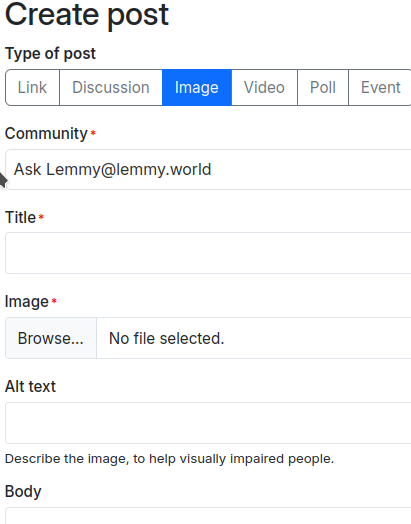
All the mobile apps I checked do something similar, with no extra nudging, just an empty text field. Generally the mobile app devs are keen on new ideas like this, maybe do a post in the Voyager or Blorp community and see where that goes.
I try really hard to always add alt text! Maybe this is something the Lemmy software/apps need to support more, e.g. prompt the user if no alt text is provided.
Just checked, and Mastodon provides a little warning to tell you to add alt text:

It’s probably not even clear to most Lemmy users that the
[]for images in markdown are where you put the alt text.Didnt know it. Wondered what to do with the inside of the brackets in markdown. Makes sense though
It’s probably not even clear to most Lemmy users that the [] for images in markdown are where you put the alt text.
I certainly just learned something new!
Mastodon is ostensibly a broadcast communication method between users. Lemmy/Piefed is a link aggregator.
There’s a different emphasis on responsibilities here. If I’m broadcasting something for people’s benefit, I want to extend that to everyone as best as I can, and it’s my content, so I’m responsible for doing so.
If it’s just “here’s a website or image I found”, do I care more than the original creators did?
My version of the Jerboa app doesn’t explicitly say how to add alt text, so I think it’s partially an app support issue. I only know how to do it for inline comment images.
Boosting itself is closer to Mastodon terminology to begin with. The idea of reblogging a single comment or reply isn’t as prevalent, as much as crossposting a thread.
I’ve added alt text as part of links in most of my comments with images or videos, I just don’t know if anyone has seen them? Can you view this one?

Visible on Voyager by tapping the image
I access piefed via web browser and no, there’s no way I can find to see your alt text.
The impression I get from these comments is that this issue is really both about the software (Devs don’t prioritize alt text much) and cultural (users don’t either). Which came first and led to the other? Who knows…
The only way i know is if you select “view source”.
What masto does is it adds it both to “alt” and to “title”. “title” makes it show up in a tooltip, “alt” is for screenreaders and whatnot.
I forgot how to add title/hover text on an inline image… let me test:

Ok I remember now. You have to add a space then double quotation marks after your URL, within the parentheses. This image has both alt text and title text. I’m not going to do both on the regular.
Oh nice! That works on our end! (lemmy web)
The software should just do that for you by default, IMO. No extra effort.
– Frost
Next time you think of skipping alt text, think of the poor AI crawlers and all the unlabeled images they have to save.









