
Cross-posted from “My selfhosting setup so far” by @innocentz3r0@programming.dev in !selfhosted@lemmy.world
Hey everyone! I’m sort of still green for selfhosting, but I wanted to share my setup so far:
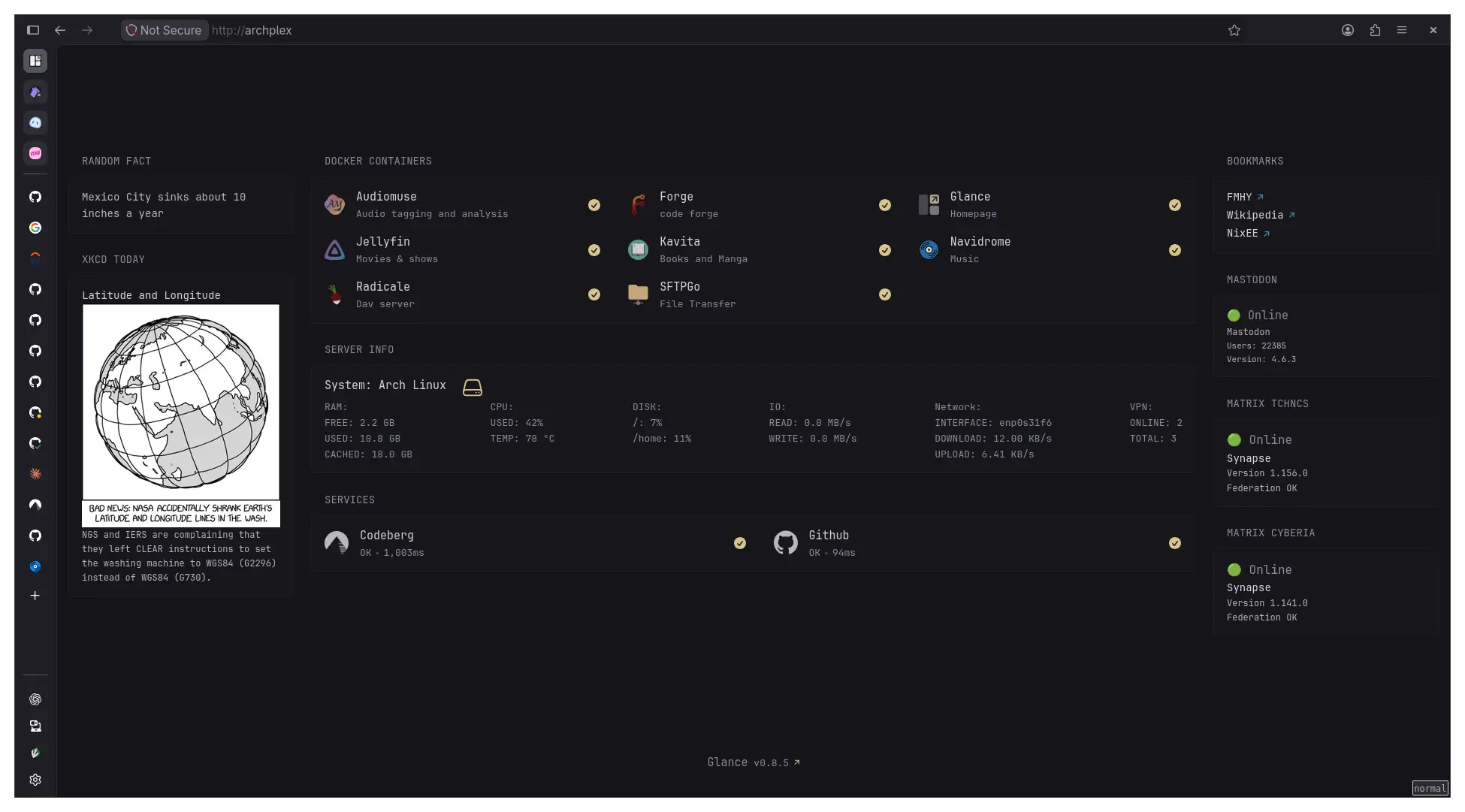
The following services are selfhosted in docker
- Audiomuse (smart music tagging, mood based and all that)
- Navidrome for music hosting
- Jellyfin for TV shows (not a lot) and Films (not a lot again, but steadily increasing)
- Radicale for serving contacts/TODOs/calendar
- SFTPGo to act as my drive
- Kavita for ebooks and manga (I have tons of both)
- Glance for homepage
- forgejo for git forge hosting
The system specs are kind of visible in the homepage, so I won’t spell them out here again. Mostly an old optiplex running arch, though I want to change it to nixos later on.
System tools:
- nushell for shell
- calibre for ebook management and tagging + fanficfare plugin to download fanfictions
- Caddy for reverse proxy (so I don’t have to remember ports)
- netbird for VPN (also because it allows me to set wildcard DNS resolution for nodes, so I don’t have to set up a dedicated pi-hole or adguard)
- Handbrake and ffmpeg for processing videos and such
- beets for tagging music
- a sysinfo script to generate system information for glance to consume
- Probably other things too, I’m forgetting
Everything is accessible only via netbird, and external inbound connections are firewalled off
Apart from that, I eventually plan on adding the following as well:
- Immich for photo hosting
- Vaultwarden for passwords
- Gollum (still debating on alternatives) for a webUI for my notes
- Paperless-NGX
I’m still thinking on more that I can add. Note that whatever I add should not need an inbound connection/stable IP address, since I don’t intend to expose the server to the public. Any suggestions/tips? Thanks!
UPDATE: Forgot to add, I’d probably add homebox too, for inventory management 😅
UPDATE 2: I’m silly, I forgot that I’m also looking into self-hosted RSS feed readers 😆
I always enjoy seeing what and how others run their home lab setups.
I have been doing a lot of work on mine as of late. Spun up a lot of new containers, as well as enhanced security on some of it.
I haven’t posted my setup, or anything like that. But I have a total of 51 containers running on an old Lenovo Small Form factor pc that has an 8th gen i5 and 16gb of DDR4. Outside of that, I just have a pi running one of my vpn connections and my backup DNS of PiHole, whereas my main DNS is Technitium running in a container.
I have checked out Glance a while back, but never did end up using it really.
whoaa! I’d love to see your setup some time!
I’d love to share!
I’ll likely get a post put together tomorrow and tag you!
I just went through every compose file I had and removed all exposed ports (it possible that is) and required access only through my Caddy instance. Enabled HSTS for all sites.
And the entire lab is separated between 3 devices. A small form factor lenovo box (16GB of DDR4 with an i5), a Raspberry Pi 4 with 8GB of ram, and an old synology that was given to me. . Redundant DNS, a Technitium container, and my pi running Pihole.
DNS records and Caddy directives are set via Docker labels.
A combination of Signal notifications and Ntfy to alert me where necessary. That setup including unified push for a number of apps.
Music streaming, with a companion container that scribbles music, as well aa helped scripts that run on systemd timers thar sync music from live location, to backup 1, to backup 2 aka my desktop HDD. I have a heller script being run on a disposable docker container that searches for LRC files so I have synchronized lyrics for my music.
And a bunch more I am forgetting.
I like nerding out about this, and Lemmy is the only place I can talk about this where anyone understands. No one in my life IRL are tech savvy
Uh, setting up DNS entries via docker docker labels is on my todo list since the beginning… what are you using to do it? I don’t run PiHole but Blocky, more lightweight and I like the yaml only config.
DNSWeaver the way I have this setup is DNSWeaver reads the labels, and connects to both PiHole and Technitium.
I was only using PiHole for many years. But in learning I could automate DNS entries with DNSweaver, I needed something more powerful. The issue I have with PiHole for DNS with DNSWeaver is that DNSWeaver can’t delete DNS records. DNSWeaver uses txt records and well PiHole doesn’t support that.
So I installed Technitium.
I’ve never heard od Blocky.